
MIDI how-to
How to split chords into separate MIDI channels
You can split chords after you record them, with your DAW’s editing tools, or live as you play, so every part sounds on its own instrument straight away. Here are both ways.
Black Friday Sale: Simple Divisi is just $19.99 (was $49) until 3 December. No code needed.
AU, VST3 and standalone · Mac and Windows · Free 14-day trial
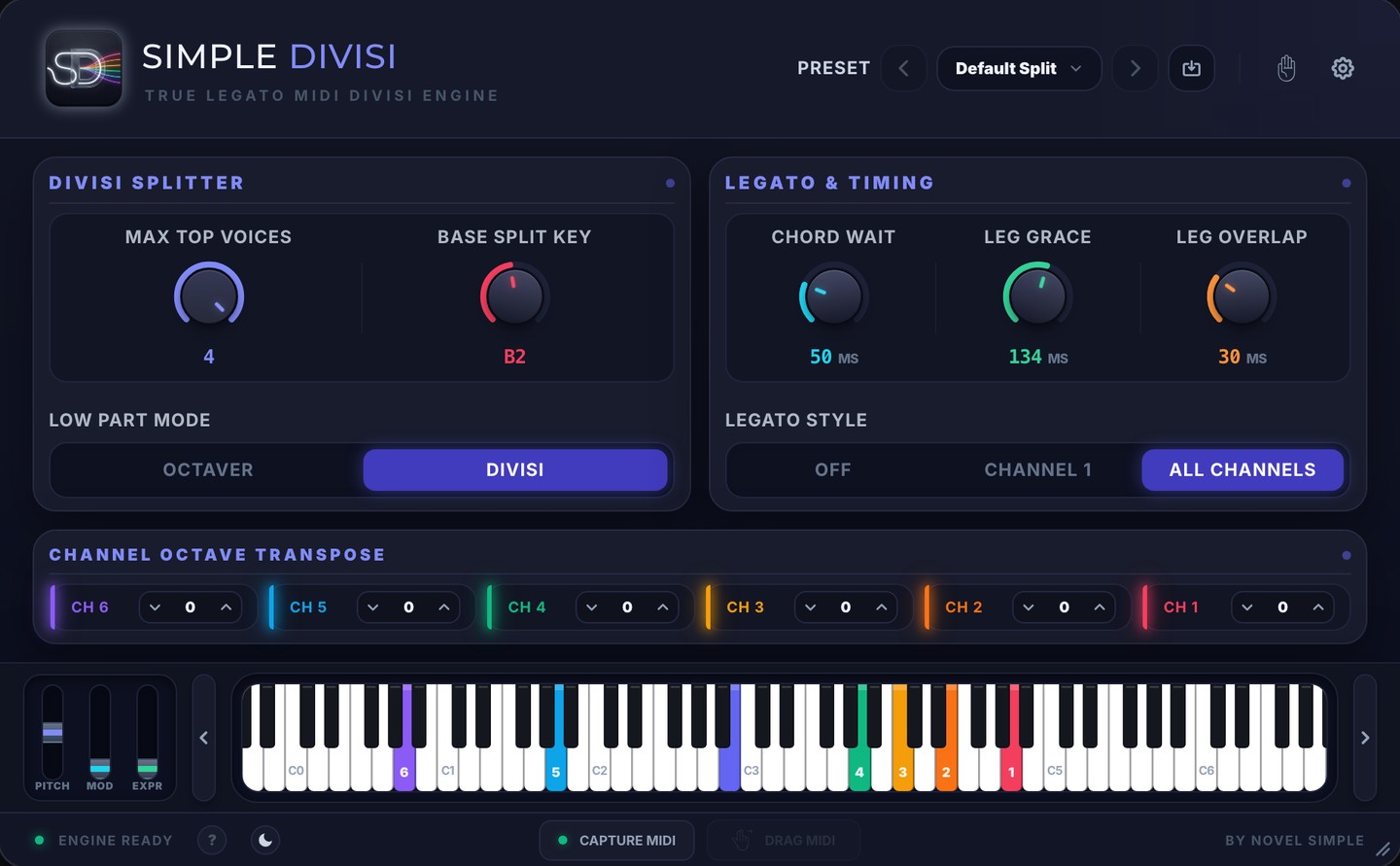
The live way: as you play, with Simple Divisi
You hear every part on its own instrument while you play, and your legato stays legato.
Real time
One chord in. Six voices out.
Each note of the chord lands on its own instrument and its own track, while you play. The top note goes to channel 1, the next to channel 2, and so on, with two channels for the bass.
Voice by voice
Each voice stays on its instrument
A note you’re holding never moves to another instrument. New notes wait for a free voice, so the parts stay where you put them.
Keep the take
Six MIDI tracks, ready to edit
Press Capture MIDI and play. Drag the result into your DAW and it arrives as six MIDI tracks. Or record all six tracks live.
Hear every part as you play
After recording, in Logic Pro
Logic Pro can split recorded chords by pitch. Apple describes these steps:
- Open the MIDI region in the Piano Roll Editor and select the notes.
- Choose Functions › Set MIDI Channel to Voice Number. The highest note of each chord goes to channel 1, the next note down to channel 2, and so on.
- In the Tracks area, choose Edit › Separate MIDI Events › By Event Channel to make one region per channel.
- Move each region to the track of the instrument that should play it.
After recording, in any DAW
- Duplicate the recorded region onto one track per part.
- On each track, keep one voice and delete the others. Logic’s Edit › Select › Highest Notes and Lowest Notes help with the top and bottom lines.
Both ways work after the fact. While you play, every note still sounds on one instrument, so you don’t hear the parts until you’ve split them.
True legato
Legato stays legato
Sample libraries play their legato transitions when one note overlaps the next. Most MIDI splitting cuts notes short, so you lose them. Simple Divisi keeps each voice connected, and Leg Grace and Leg Overlap let you match it to your library.
Compatibility
Works in your DAW
Use it in Logic Pro’s MIDI FX slot, or as a VST3 in Cubase, Studio One, Reaper and Bitwig. For Ableton Live, FL Studio and Pro Tools, the included standalone app sends the six channels through its own virtual MIDI port.
See Simple Divisi in action
One payment. Yours to keep.
- Six output channels with legato on every part
- AU, VST3 and a standalone app
- Mac and Windows
- Logic Pro, Cubase, Studio One, Reaper, Bitwig, Ableton Live, FL Studio and Pro Tools
- Capture and drag six MIDI tracks
- Try everything free for 14 days first
Black Friday Sale: Simple Divisi is just $19.99 (was $49) until 3 December. No code needed.
Requires macOS 10.15 or later, or Windows 10 or later. Makes no sound itself: use it with your own instruments.
Questions
Can Logic Pro split chords by itself?
After recording, yes: Set MIDI Channel to Voice Number and Separate MIDI Events by Event Channel. Its Studio Strings instrument also has an Auto Voice Split button for its own section. To split live across any instruments, you need a plugin such as Simple Divisi.
Does Simple Divisi split chords while I play?
Yes. Each note goes to its own channel and instrument as you play, and a note you’re holding never moves to another instrument.
Does it work in Ableton Live and FL Studio?
Yes. Run the included standalone app next to your DAW, and it sends the six channels in through its own virtual MIDI port. In Logic Pro, Cubase, Studio One, Reaper and Bitwig it runs as a plugin.
Does Simple Divisi make sound?
No. It’s a MIDI plugin and standalone app: it plays your own instruments, such as Kontakt, Opus, Spitfire or your DAW’s instruments.
One chord in. Six voices out.
Play the parts once and hear every one on its own instrument.
More comparisons
We make Simple Divisi, so we aren’t neutral. Details about other products come from their own websites, checked on 6 November 2026, and may have changed since. “Not described on its site” means we couldn’t find it there, not that the product can’t do it. Sources: Apple: Studio Strings, Apple: Split chords in the Piano Roll Editor. Logic Pro is a trademark of Apple Inc. Novel Simple isn’t affiliated with them.