
VIDEO SILENCE REMOVER FOR MAC AND FINAL CUT PRO
Hours of editing, done in seconds.
Cutomatic removes silence from video, makes the jump cuts for you and sends a clean, editable timeline to Final Cut Pro, in under 10 seconds.
Black Friday Sale: Cutomatic is just $9.99 (was $49) until 3 December. No code needed.
No subscription · Works offline · Your files never leave your Mac
Under 10 seconds
From recording to finished cut list
No re-encoding
Your footage keeps its original quality
Fully editable
Real clips on your Final Cut Pro timeline
Pay once
No subscription, and your files stay on your Mac
Stop cutting silences by hand
Cutomatic is an automatic video editor with one job: removing silence. This video silence remover for Mac cuts dead air and awkward pauses, makes the jump cuts and builds an editable Final Cut Pro timeline. It’s made for YouTubers, podcasters, educators and anyone editing talking-head video.
Remove silence from video in three simple steps
1
Load your video
Drop in your recording, with separate audio if you have it.
2
Click Process
Every silent section appears on the waveform.
3
Open in Final Cut
Or save an FCPXML file, or export.
SILENCE REMOVER
Every silence, found for you
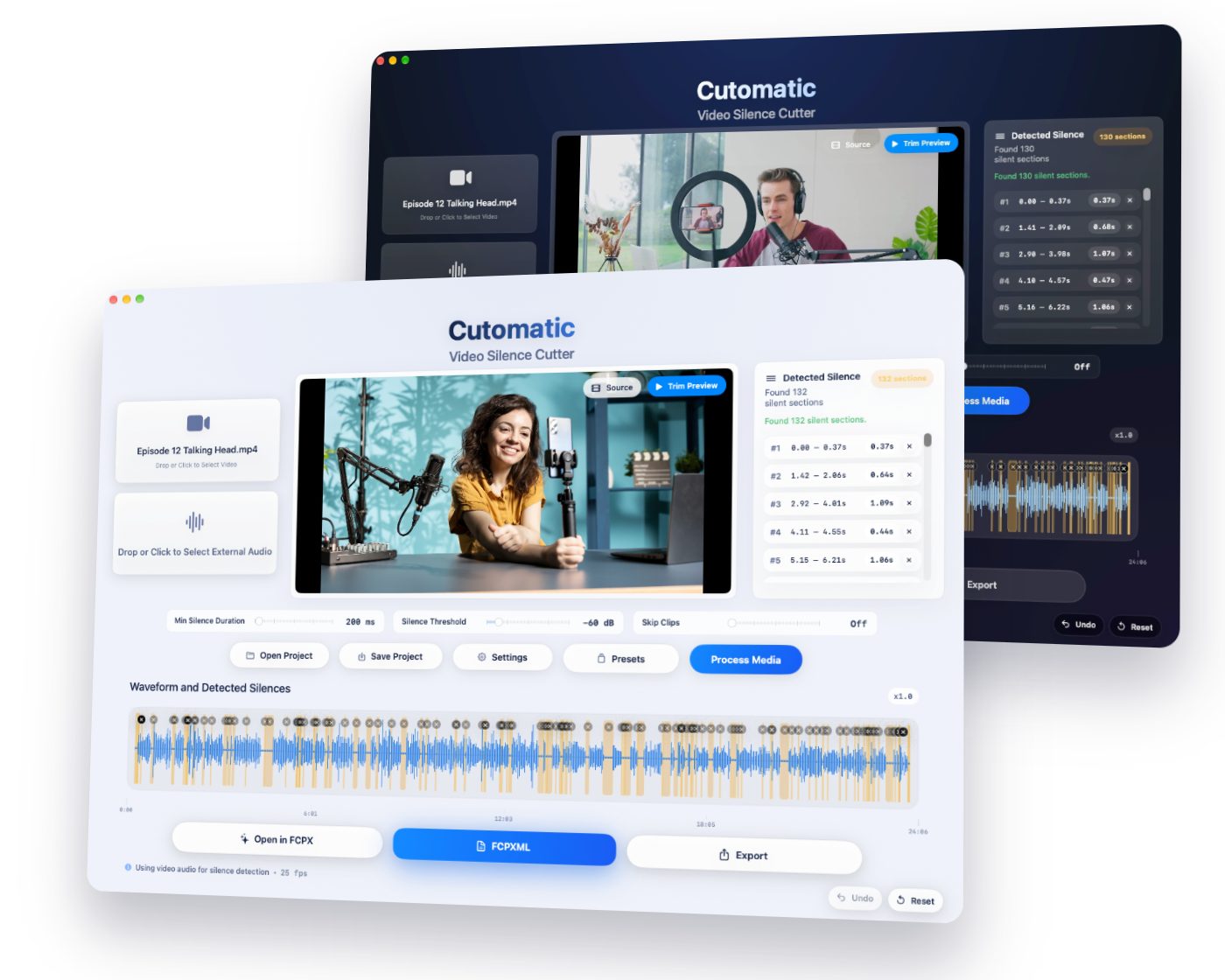
Click Process Media and each silent section is marked on the waveform and listed beside it, so you can see exactly what will go.
STAYS EDITABLE
Automatic jump cuts in Final Cut Pro
Your result opens as normal, separate clips with the jump cuts already made. Nothing is locked in, so you can trim, move or restore any cut the way you always do.
ORIGINAL QUALITY
No re-encoding, no quality loss
Cutomatic never re-encodes your video. It only removes the pieces you don’t need, so everything that stays keeps its original quality.
Save hours on your next edit
Black Friday Sale: Cutomatic is just $9.99 (was $49) until 3 December. No code needed.
You stay in control
Keep what matters
Click a silence’s ✕ to keep that section. Undo puts the cut back.
Check before you commit
Compare your original with the shortened version, right in the app.
Three ways out
Open in Final Cut Pro, save an FCPXML file, or export audio, video or both.
Tune the silence cutter to your recording
Three simple controls handle noisy rooms, relaxed talks and fast-paced videos.
Silence Threshold
Set what counts as silence, so a noisy room is handled properly.
Min Silence Duration
Keep natural breathing room, or tighten it for rapid-fire pacing.
Skip Clips
Remove tiny leftovers like mic bumps, throat clicks and pops.
EXTERNAL AUDIO
Recorded your audio separately?
Load your video and your external audio. Cutomatic listens to the clean audio and applies the cuts to your video, which also helps with multi-cam recordings.
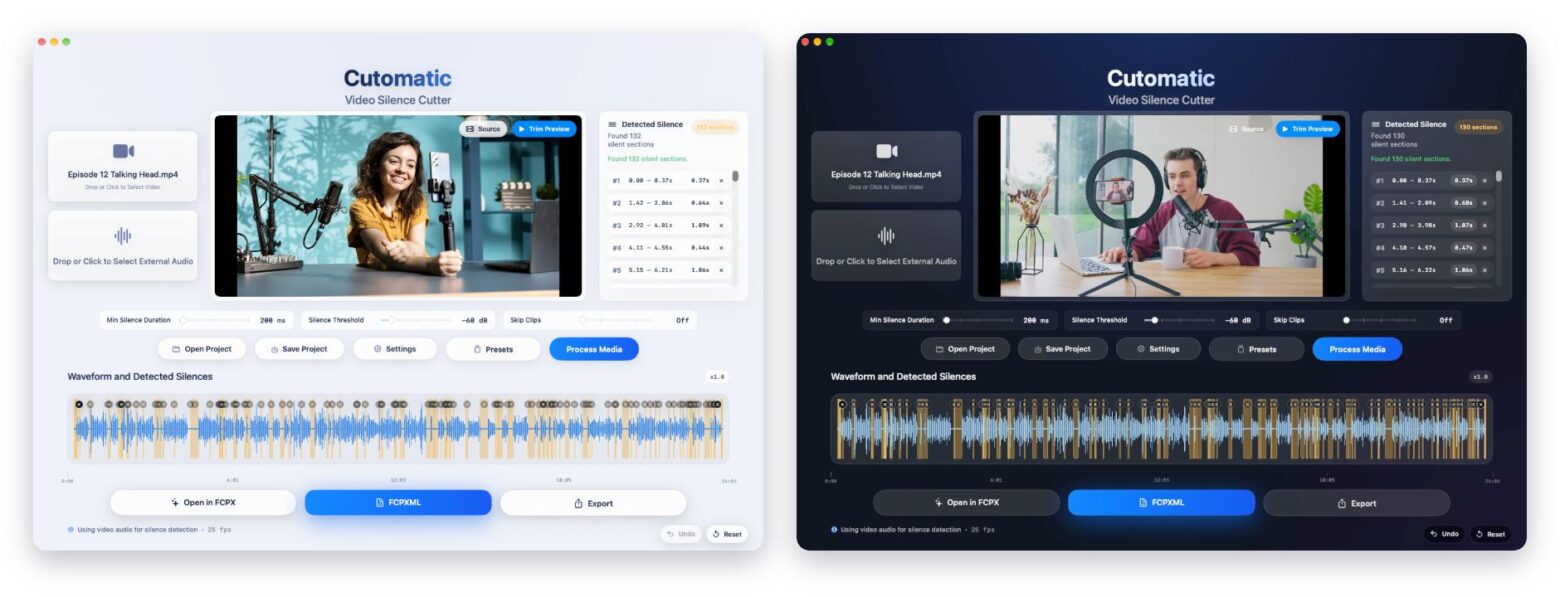
Everything in one window
- Drop in your video.
- Add separate audio (optional).
- Switch between Source and Trim Preview.
- See every detected silence.
- Min Silence Duration, Silence Threshold and Skip Clips.
- Process Media.
- Waveform: click ✕ to keep a section, Undo to restore it.
- Open in Final Cut, save FCPXML or export.

PRIVATE AND OFFLINE
Yours, on your Mac
Your files stay on your computer, with no uploads. Pick the light or dark look to suit your setup.
See Cutomatic in action

One payment. Yours to keep.
- No subscription, ever
- No re-encoding, so no quality loss
- Works offline, on your Mac
- Your files never leave your computer
- Tested with Final Cut Pro 11 and later
- Try everything free for 14 days first
Black Friday Sale: Cutomatic is just $9.99 (was $49) until 3 December. No code needed.
Requires macOS 12.4 (Monterey) or later.
Try free for 14 days, no commitment
Get the Trial Download
Enter your email and we will send the trial download links right away.
FAQ
Load your video in Cutomatic and click Process Media. It marks every silent section, usually in under 10 seconds. Then click Open in FCPX, save an FCPXML file, or export the finished audio or video.
Final Cut Pro doesn’t include a one-click silence remover, so editors usually blade and ripple delete each pause by hand. Cutomatic does that step for you and opens the result as a normal, editable timeline.
Load your video in Cutomatic, click Process Media, then click Open in FCPX. Each silence is cut and each section you keep arrives as a separate clip, so the jump cuts are already made and stay fully editable.
Yes. Set how long a pause must be with Min Silence Duration and how quiet it must be with Silence Threshold. You can keep any pause you want with one click.
For one job, yes. It automatically finds and cuts silence. It doesn’t add captions or music or choose your best takes, and you carry on editing in Final Cut Pro.
No. Cutomatic doesn’t re-encode your video at all. It only removes the sections you don’t need, so what stays keeps its original quality.
No. You pay once and keep it, with no subscription. You can try it free for 14 days first.
No. Everything is processed on your Mac and your files never leave it. You only need to be online to activate, and once every 30 days to keep it activated.
No. Cutomatic removes silence and pauses, based on the audio level and the settings you choose. It doesn’t transcribe your speech or remove filler words.
Video: MP4, MOV, M4V, AVI. Audio: MP3, WAV, M4A, AAC, AIFF.
Cutomatic exports FCPXML marker files that open directly in Final Cut Pro. Tested to work with Final Cut Pro 11 and later
Load your video and then your external audio file. Cutomatic analyzes the external audio and applies the cuts to your video timeline — useful when your camera audio is noisy or low quality and also for Multi Cam Recordings. But the audio must be in sync with video for this to work properly.
The App works completely offline. You need to be online only when you activate and once every 30 days to retain activation.
Hi, I'm Jithendra — a music producer and developer based in Chennai, India. I built Cutomatic because I needed it for my own workflow, and I'm releasing it so other creators can benefit too.
Supported Formats:
Video: MP4, MOV, M4V, AVI.
Audio: MP3, WAV, M4A, AAC, AIFF.
System Requirements:
macOS 12.4 (Monterey) or later.
4 GB RAM minimum; 8 GB or more recommended.
Tested to work with Final Cut Pro 11 and later for XML workflows.
Comparing tools? See how Cutomatic compares.
Get your hours back
A clean, editable timeline in under 10 seconds. Pay once, use forever.
Black Friday Sale: Cutomatic is just $9.99 (was $49) until 3 December. No code needed.
Version History
Released: 22/04/2026
To download the latest version please visit Trial page here or My Licenses page here For older versions for Contact Page
- Improvement: Odd Frame Rate Compliance: Cutomatic now handles unusual frame rates more reliably, reducing sync drift and preserving timing accuracy across non-standard video sources.
- Compatibility: Hidden Camera Timestamp Support: The app is better aligned with cameras that store hidden or nonstandard timestamps, improving metadata handling for tricky footage.
- Improved: DJI Camera Compatibility: Updated compatibility for DJI camera exports, making imported clips more accurate and stable in the timeline.
- Enhanced: Multi-Cam Time Sync: Multi-camera synchronization has been refined for greater precision, giving you tighter alignment across multiple angles and better overall playback sync.
Released: 10/04/2026